Live Markets
tip
Only markets that are live or approved are displayed on the MM dashboard; proposed and rejected markets are not shown.
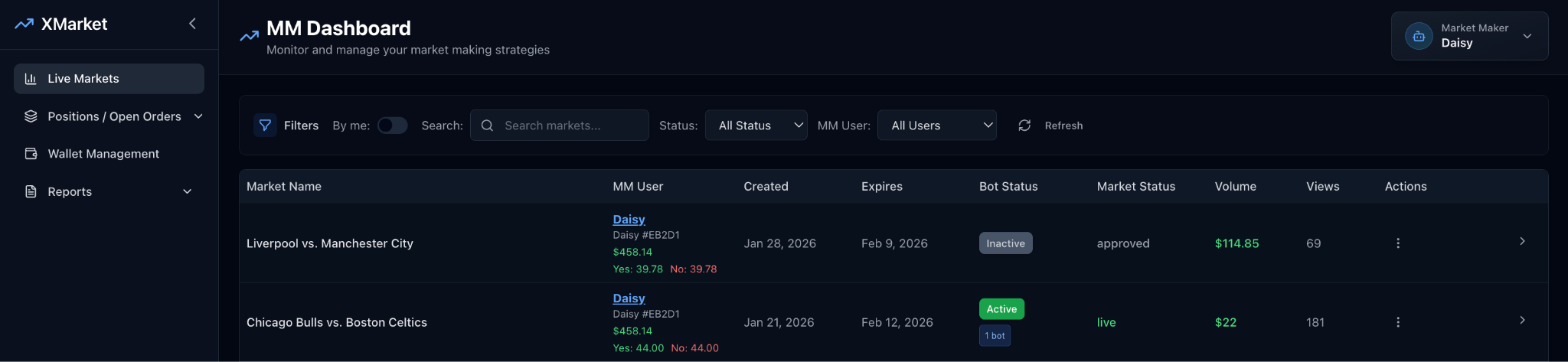
| # | Field | Description |
|---|---|---|
| 1 | Market Name | Names of all live and approved markets displayed on the admin dashboard. |
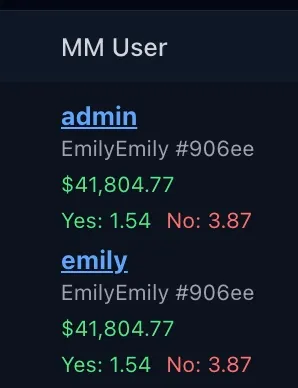
| 2 | MM User | Market Maker (MM) bot user information, including bot user name and ID, shares (Yes and No) currently held, and balance available. |
| 3 | Created | Date when the market was created. |
| 4 | Expires | Scheduled expiration date of the market. |
| 5 | Bot Status | Current status of the bot (Active or Inactive), including the number of active bots running (e.g., 1 bot, 2 bots). |
| 6 | Market Status | Current market status (Live or Approved). |
| 7 | Volume | Total volume of the market. |
| 8 | Views | Total number of views for the market. |
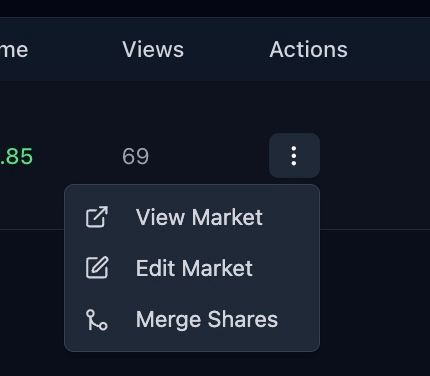
| 9 | Actions | Available management actions: View market, Edit market (Edit/Pause/Stop bots), Merge share (combine YES/NO positions after resolution). |
| 10 | Search Markets | Search markets by name. |
| 11 | Status Filter | Filter markets by bot status. |
| 12 | MM Users Filter | Filter markets by specific MM bot users. |
| 13 | Refresh | Current position value. |
| 14 | P&L | Profit or loss (color: green/red). |
| 15 | Action | Reloads the dashboard to display the most up-to-date market data. |
MM User Detail
Actions Detail