Market Making Strategy
Strategy for bot operation.
Initial Seeding
Creates the first buy/sell (Yes/No) orders in the order book and establishes an initial price level (mid price) for the market.
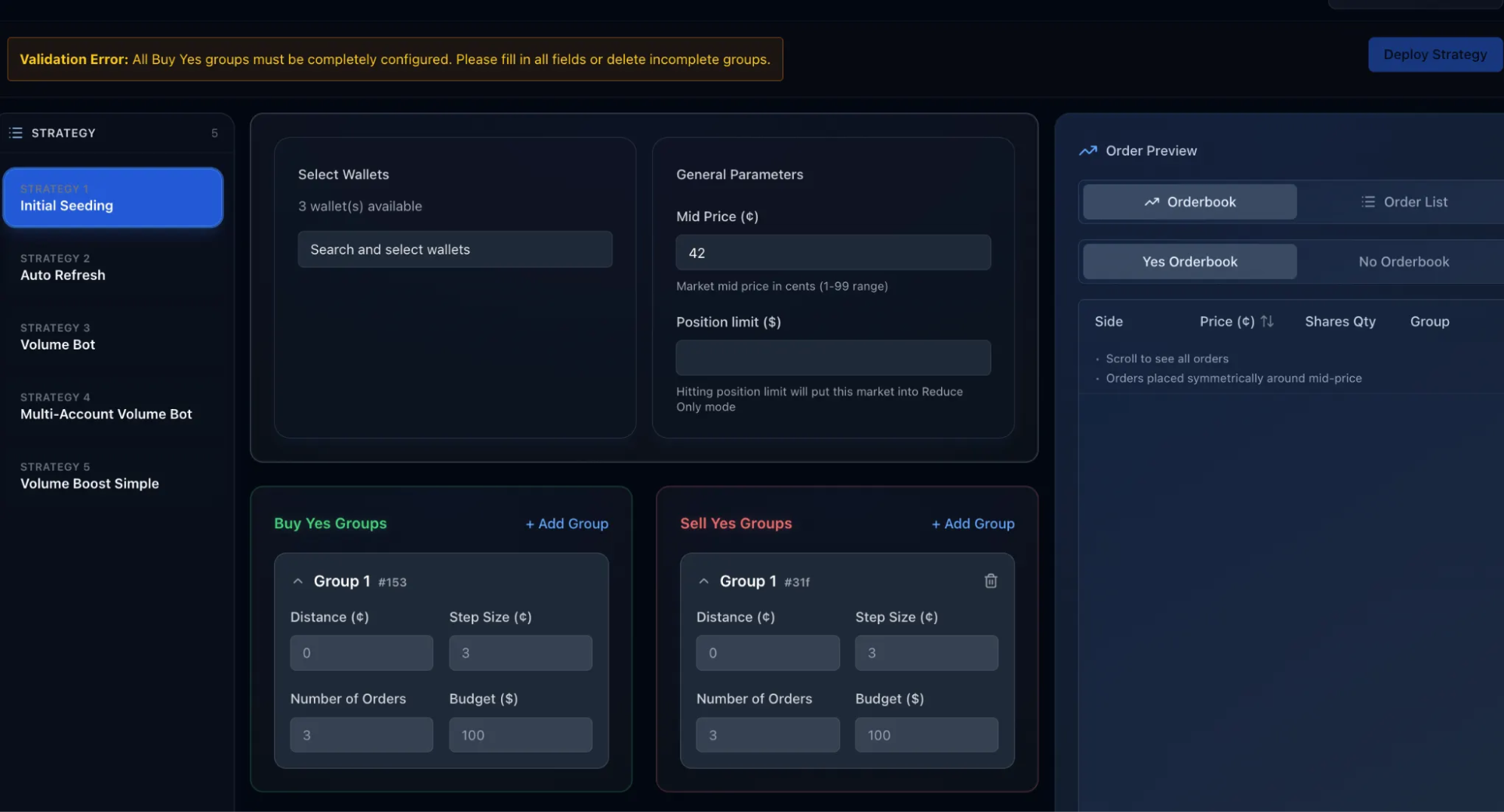
| # | Fields | Description |
|---|---|---|
| 1 | Select Wallets | Choose one or more wallets that will be used to place and manage orders for this strategy. Only selected wallets will execute trades. |
| 2 | Mid Price (¢) | The reference price (in cents) around which buy and sell orders are placed. Valid range: 1–99. Orders are placed symmetrically above and below this price. |
| 3 | Position Limit | The maximum net exposure allowed for the selected wallets in this market. Once the limit is reached, all active orders are automatically stopped. |
| 4 | Distance | The price gap from the mid price where the first order is placed. Distance = 0 places the order at the mid price. Note: The distance of Group 2 must be higher than that of Group 1. |
| 5 | Step Size | The price difference between each order in the group. A smaller step size places orders closer together. |
| 6 | Number of Orders | Total number of orders placed in the group (maximum: 50 orders). Applies separately to buy and sell sides. |
| 7 | Budget | The maximum total USD amount allocated to this order group. The budget is evenly distributed across all orders. |
| 8 | Add Group | Create additional order groups with independent configurations. Useful for layering liquidity at different price ranges. |
Order Preview
Preview how orders will appear before activation.
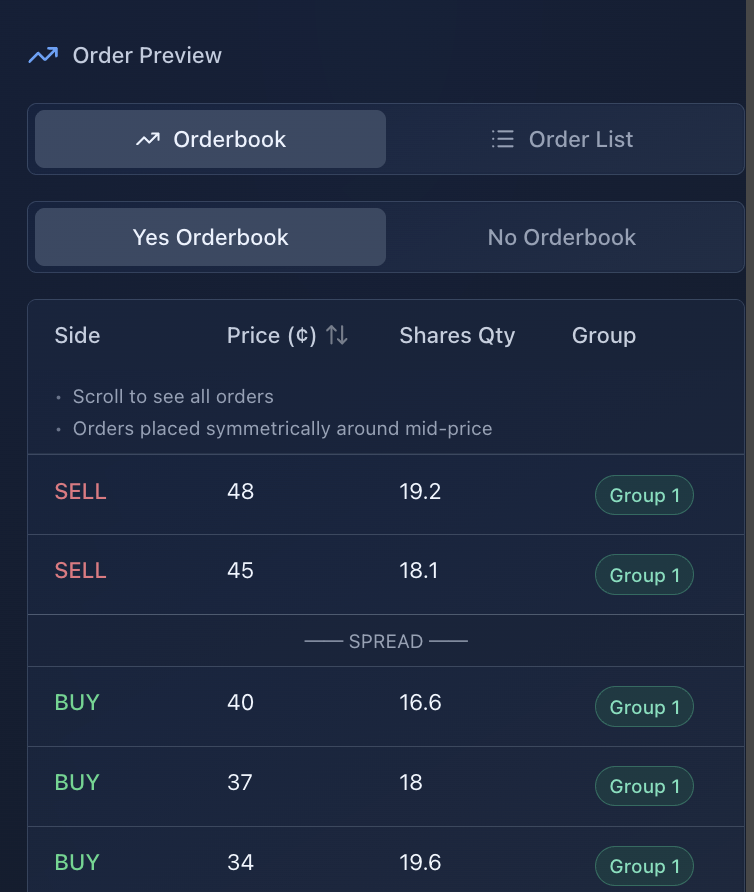
| # | Fields | Description |
|---|---|---|
| 1 | Orderbook | Live buy/sell orders by price. |
| 2 | Order List | View orders as a flat list (not price-stacked). |
| 3 | Yes Orderbook | Orders betting on YES. |
| 4 | No Orderbook | Orders betting on NO. |
| 5 | SELL | Orders selling shares. |
| 6 | BUY | Orders buying shares. |
| 7 | Price (¢) | Price per share in cents. |
| 8 | Shares Qty | Number of shares at that price. |
| 9 | Group | Order group identifier (e.g., Group 1) used for strategy batching. |
Auto Refresh
Auto Refresh is a liquidity maintenance strategy that automatically replaces filled or canceled orders to keep the order book active and balanced over time.
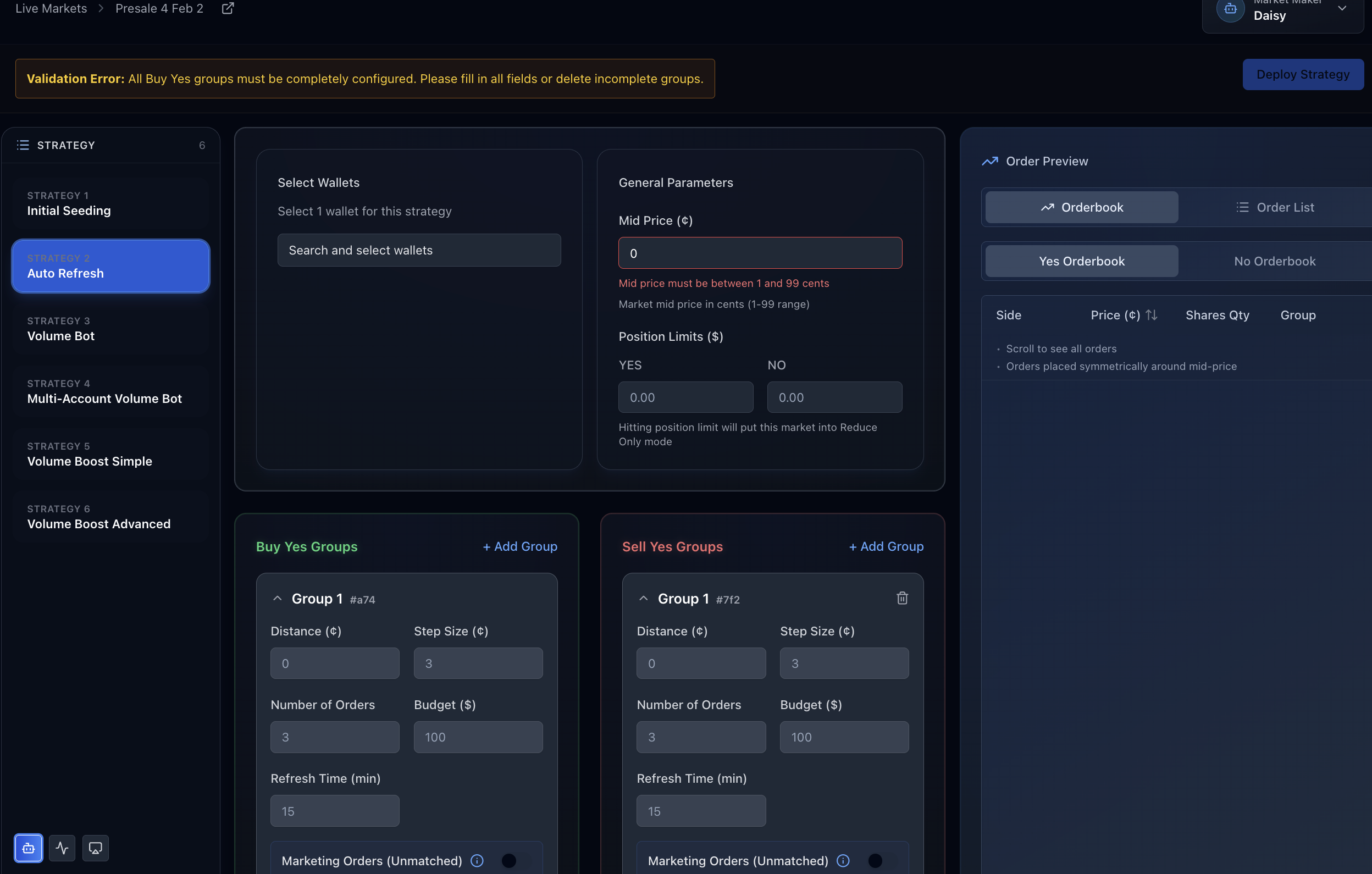
| # | Fields | Description |
|---|---|---|
| 1 | Select Wallets | Choose one or more wallets that will place and manage orders for this strategy. |
| 2 | Mid Price (¢) | Target reference price (in cents) around which buy and sell orders are created. Valid range: 1–99. |
| 3 | Position Limit | Maximum net exposure allowed for the selected wallets in this market. When the limit is reached, all active orders are automatically stopped. |
| 4 | Distance (¢) | The price gap from the mid price where the first order is placed. Distance = 0 places the first order at the mid price. Note: distance of Group 2 must be higher than distance of Group 1. |
| 5 | Step Size (¢) | Price difference between consecutive orders in the group. |
| 6 | Number of Orders | Total number of orders placed in the group (maximum: 50 orders). |
| 7 | Budget | Maximum total dollar amount allocated to this order group. The budget is evenly distributed across all orders. |
| 8 | Add Group | Creates an additional order group with its own independent configuration. |
| 9 | Refresh Time (min) | Frequency at which the system checks and refreshes orders. Filled or canceled orders are automatically replaced. Note: The refresh time of Group 2 must be higher than that of Group 1. |
| 10 | Marketing Orders (Unmatched) | Enable this to place "marketing" orders that create the appearance of volume/depth but should not be matched against real users. |
Volume Bot (1 account)
A volume bot is an automated trading bot designed to increase or simulate trading volume in a market.
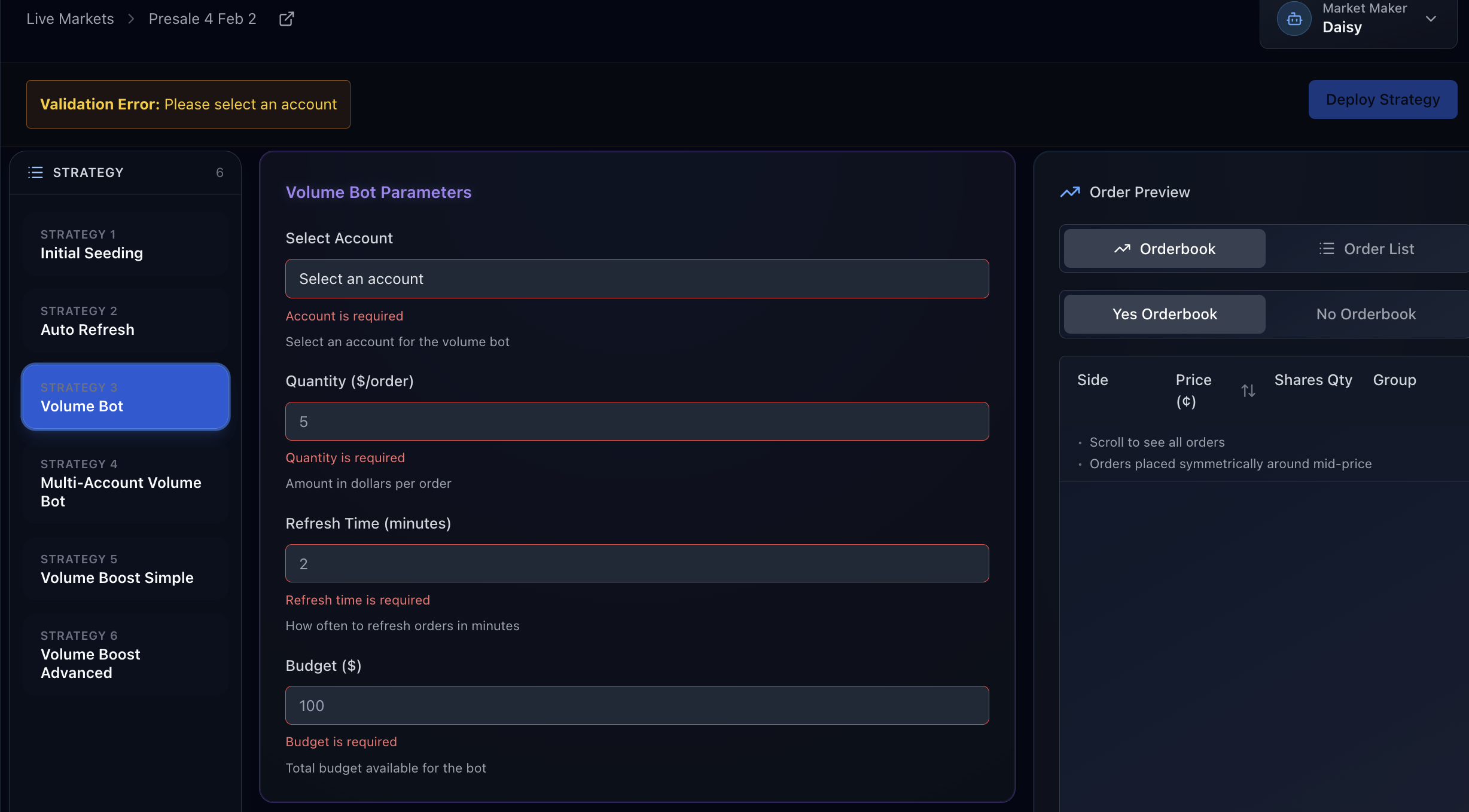
| # | Fields | Description |
|---|---|---|
| 1 | Select Account | Choose the account that the volume bot will use to place trades. |
| 2 | Quantity | The dollar amount used for each buy or sell order. |
| 3 | Refresh Time | How often the bot cancels old orders and places new ones. |
| 4 | Budget | The total trading volume the bot is allowed to generate. Once this amount is reached, the bot stops placing new orders. |
Multi-Account Volume Bot
A bot that uses multiple wallets to place buy and sell orders, creating trading volume and keeping the market active.
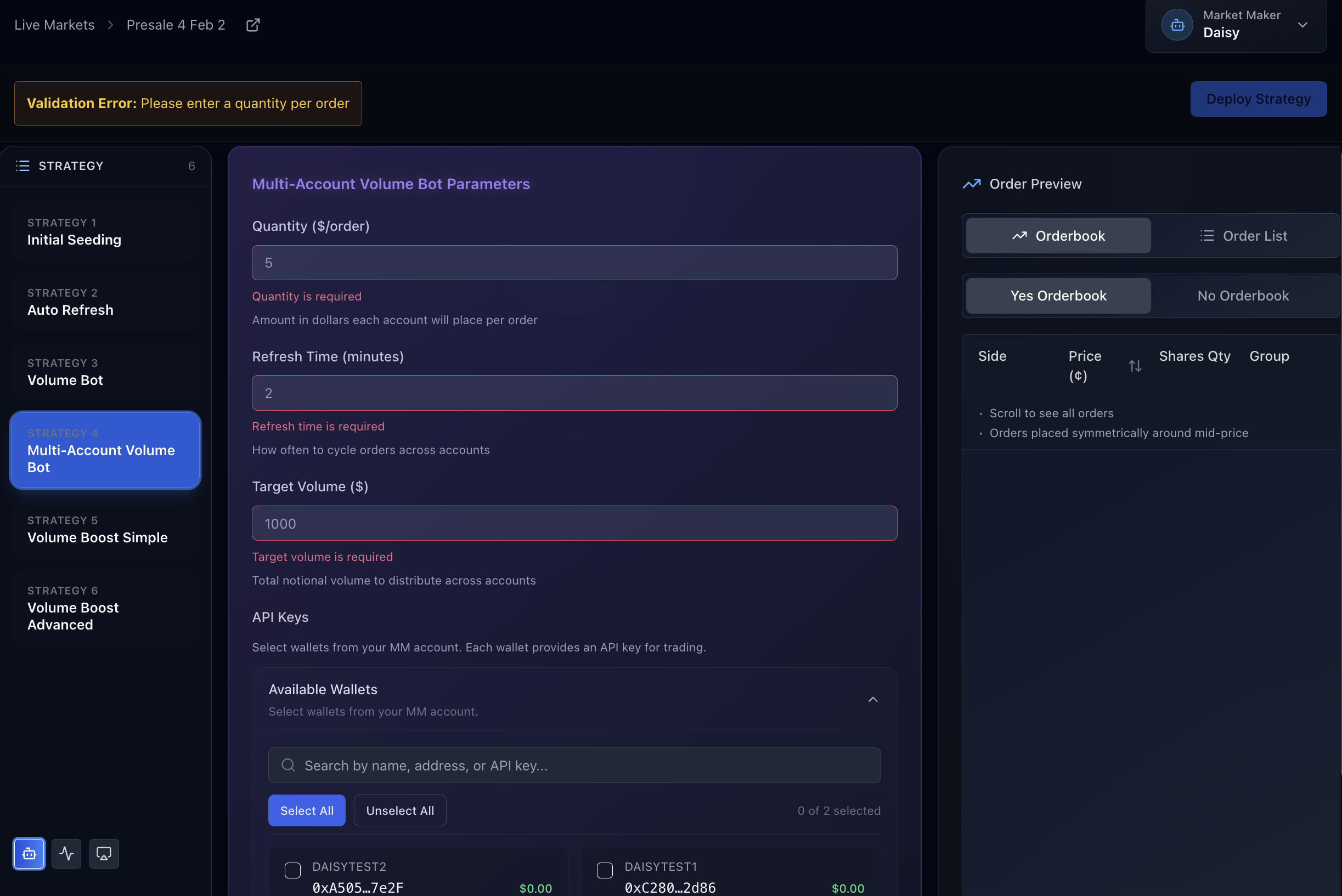
| # | Fields | Description |
|---|---|---|
| 1 | Quantity | The dollar amount used for each individual order the bot places. |
| 2 | Refresh Time | How often the bot cancels and re-places orders. |
| 3 | Target Volume | The total trading volume the bot aims to generate before stopping. |
| 4 | API Keys | API keys used to connect and operate multiple accounts simultaneously for volume generation. |
Volume Boost Simple
Generate volume using account pairs where one creates positions and the other burns them, creating matched trades.
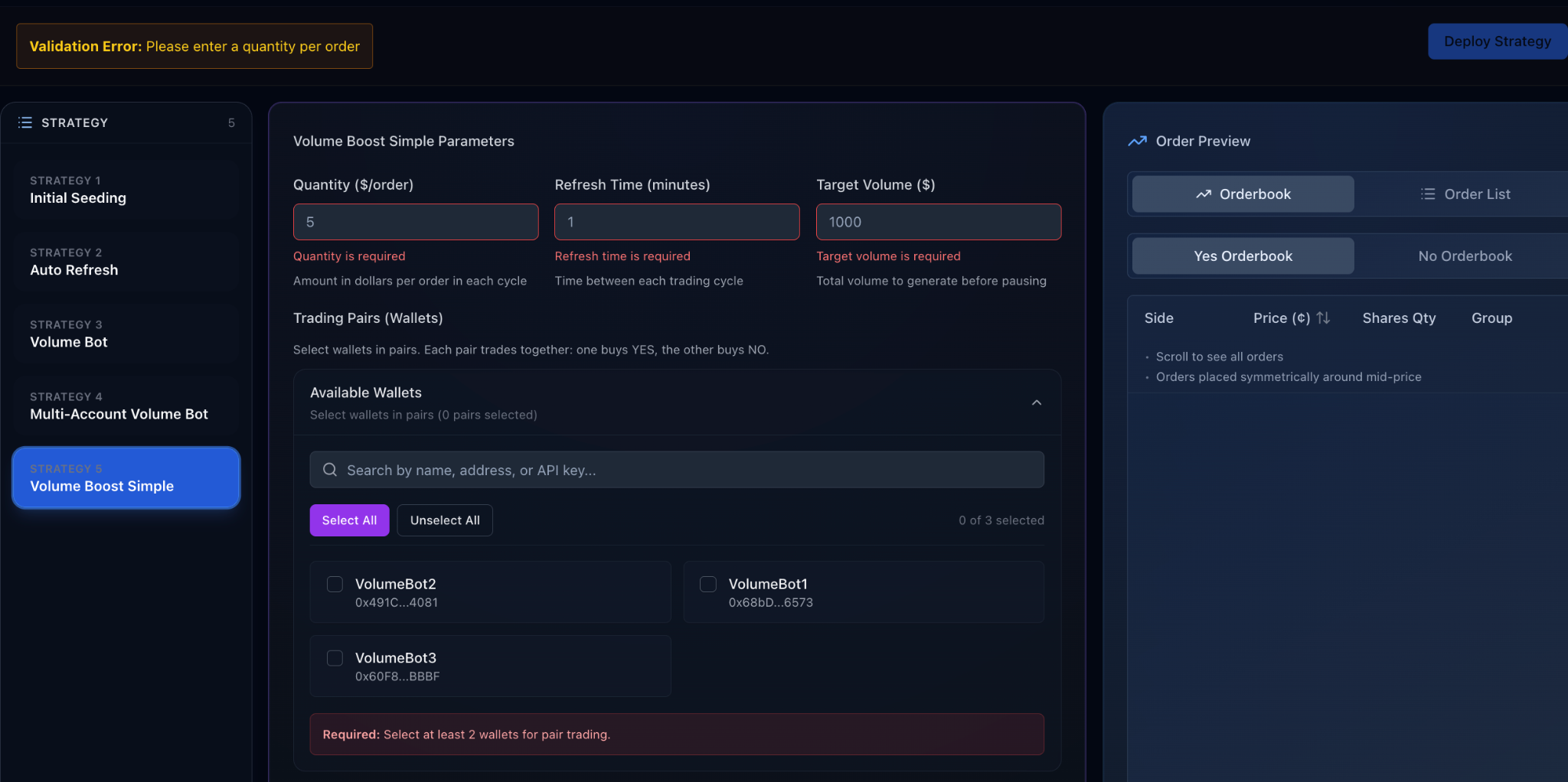
| # | Fields | Description |
|---|---|---|
| 1 | Quantity | The dollar amount used for each order placed by the bot. |
| 2 | Refresh Time | How often the bot cancels and re-places orders. |
| 3 | Target Volume | The total trading volume the bot aims to generate before stopping. |
| 4 | Trading Pairs (Wallet) | The wallets used to place both buy and sell orders to generate volume. |
Volume Boost Advanced
Advanced volume generation using 4+ accounts with rotating pair assignments and relay phases for maximum efficiency.
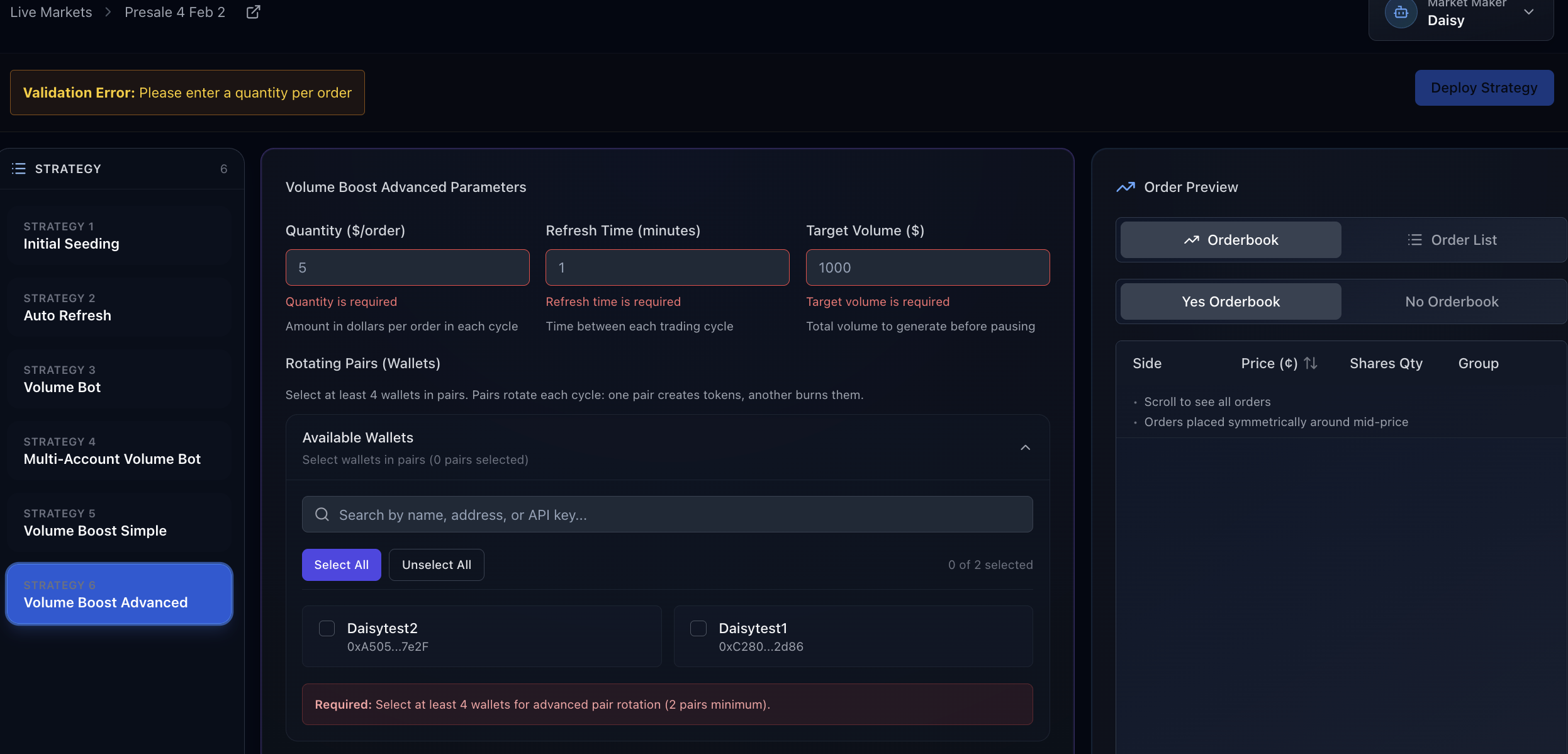
| # | Fields | Description |
|---|---|---|
| 1 | Quantity | Dollar amount used for each individual order. |
| 2 | Refresh Time | Time between each trading cycle. |
| 3 | Target Volume | Total target volume to generate. |
| 4 | Rotating Pairs (Wallets) | Uses wallet pairs where one creates tokens and another burns them per cycle. |
| 5 | Available Wallets | Displays available wallets with name and address. |
| 6 | Search Wallets | Search by wallet name, address, or API key. |
| 7 | Select / Unselect All | Quickly select or deselect all wallets. Required: Select at least 4 wallets for advanced pair rotation (2 pairs minimum). |